

Dashboard Sections
Top Navigation Bar
The navigation bar provides quick access to:- Account: Manage your profile and settings
- Create Link: Shortcut to create new links
Metrics Panel
At the top of your dashboard, you’ll see four key metrics: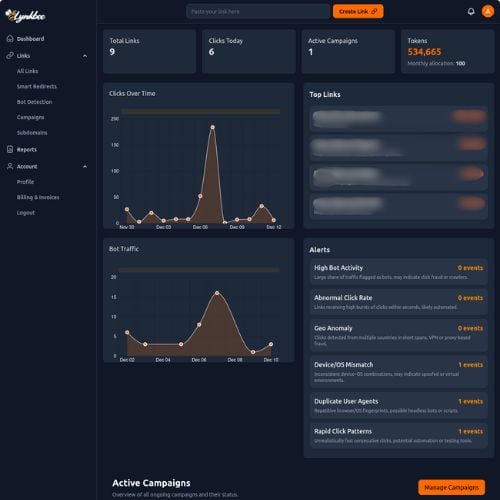
Performance Graphs
Clicks Over Time
- Displays click trends over the selected time period
- Hover to see exact values
- Use time range selector to adjust view (24h, 7d, 30d, etc.)
Bot Traffic
- Shows the percentage of traffic identified as bots
- Helps identify potential click fraud
- Alert if bot traffic exceeds safe thresholds
Top Links Section
Lists your best-performing links ranked by total clicks:- Link URL: The shortened URL and destination
- Clicks: Total number of clicks
- Actions: View details, edit, or delete
Fraud Alerts Panel
Real-time alerts for suspicious activity:Alert Types
High Bot Activity
Large share of traffic flagged as bots. May indicate click fraud or crawlers.
Abnormal Click Rate
High bursts of clicks within seconds. Likely automated traffic.
Geo Anomaly
Clicks from multiple countries in short spans. Indicates VPN/proxy fraud.
Device/OS Mismatch
Inconsistent device-OS combinations. May indicate spoofed environments.
Duplicate User Agents
Repetitive browser fingerprints. Possible headless bots.
Rapid Click Patterns
Unrealistically fast consecutive clicks. Indicates automation tools.