

Basic Link Creation
Step-by-Step
1
Navigate to Create Link
Click the “Create Link” button in the top navigation bar
2
Enter Destination URL
Paste the long URL you want to shorten in the “Destination URL” field
3
Choose Your Short URL
Either use an auto-generated short code or create a custom alias
4
Add Details (Optional)
Add campaign name, tags, and notes for organization
5
Review & Create
Click “Create Link” to generate your short URL
Link Customization
Lynkb.ee gives you full control over how your links look and behave, so they match your brand and stay easy to manage.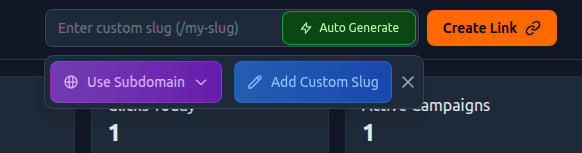
Auto-Generated vs. Custom Aliases
Auto-Generated (Recommended for simplicity)Lynkb.ee automatically creates a short, unique alias for your link. This option is fast, collision-free, and ideal when you don’t need branded naming. Custom Aliases (For branding and campaigns)
Create your own alias to make links more readable, memorable, and campaign-specific (e.g.
/launch, /promo, /signup).
Subdomain Selection (Branding & Trust)
Choose a subdomain that represents your brand or campaign. Examples:yourbrand.lyb.ee/offeryourbrand.lyb.ee/signupyourbrand.lyb.ee/summer
- Builds user trust
- Improves click confidence
- Keeps links visually consistent with your brand